Why embedded images sound convenient — but rarely are?
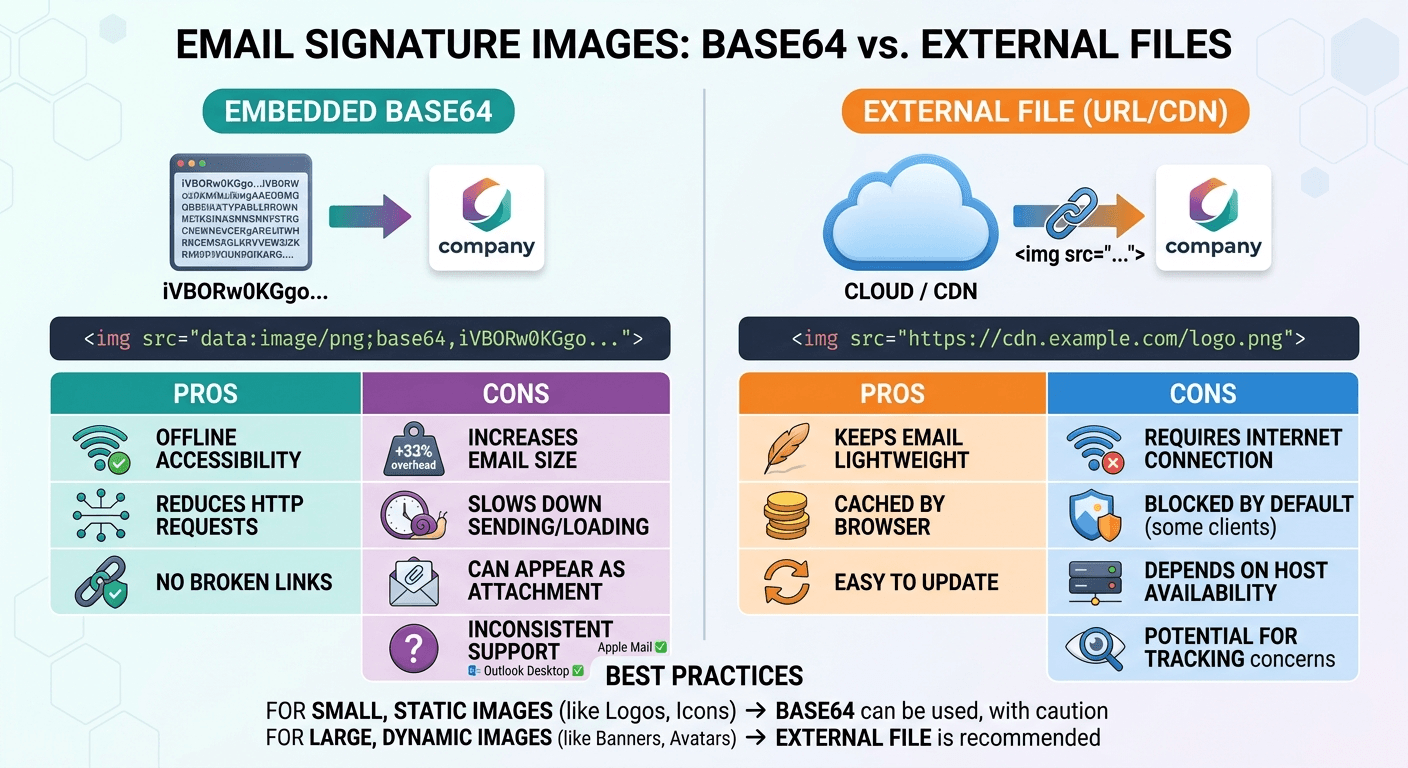
Most professional email signatures include an image. Sometimes it’s a headshot. Sometimes a company logo. Sometimes both. And when people build a signature in HTML, one question pops up quickly:
Should the images be embedded inside the HTML using Base64, or should they load from a normal image URL?
At first glance, Base64 sounds clever. Everything lives inside the HTML file. No external requests. No hosting needed. Just paste the code, and you’re done.
But email is not the web. And that difference changes everything. Let’s walk through what really happens.
The two ways images appear in email signatures
There are only two realistic approaches.
1. Images loaded from a web server (URL images)
The HTML signature contains a normal image tag:
<img src="https://yourdomain.com/logo.png">
The image lives on a server and loads when the email opens.
2. Images embedded as Base64
The image is converted into a long encoded text string and placed directly inside the HTML:
<img src="data:image/png;base64,iVBORw0KGgoAAAANSUhEUgAA...">
In theory, this means the image is already “inside” the email signature. No hosting. No external loading. Sounds neat. But email clients are picky creatures.
The big problem: email clients don't love Base64 images
Email clients are not browsers. They behave more like guarded security checkpoints. Many of them limit or block Base64 images entirely.
The most obvious example is Gmail. When a signature becomes too large because of embedded images, Gmail simply refuses to display it. The signature might still technically exist in the HTML, but the image disappears. Users see broken signatures. Not ideal when you're emailing clients.
Other email clients have their own quirks:
-
Some strip Base64 images completely
-
Some partially render them
-
Some allow them only under strict size limits
This inconsistency makes Base64 a risky choice for something meant to represent your business. A professional email signature should work everywhere. Not just sometimes.
Base64 images make signatures much larger
Here’s a detail many people miss. Base64 encoding increases file size by roughly 33%. A small logo that is 20 KB as a PNG might become around 27 KB once encoded. That may not sound like much. But email signatures are added to every single message you send. And the HTML grows fast. Add a headshot. Add a company logo. Add a small banner. Suddenly, the signature HTML becomes huge.
Large signatures can trigger several problems:
-
Emails take longer to send
-
Some email clients truncate large messages
-
Gmail has HTML clipping limits
-
Mobile email apps struggle with heavy signatures
You probably won’t notice it right away. But over thousands of emails, it adds unnecessary weight. And email systems tend to punish unnecessary weight.
Editing becomes painful
Now, imagine a common situation. Your company changes its logo. If the logo is hosted on a server, the fix is simple. Replace the image file. Every signature using that URL now shows the updated logo. Done!
But with Base64 embedded images, each signature contains its own copy of the image. Every user must update their signature manually. Every encoded image must be regenerated. Every email client must accept the updated code. This turns a two-minute change into a small administrative project. For a company with several employees, it becomes frustrating fast.
Security filters sometimes treat Base64 images differently
Email security tools watch messages carefully. Spam filters, antivirus filters, phishing detectors — they all scan the HTML. Large blocks of encoded text can raise flags. Not always. But sometimes.
Some security systems associate heavy Base64 content with suspicious emails because malware often hides inside encoded strings. Your logo is harmless, of course. But the filter doesn't know that. Most companies would rather avoid even the chance of triggering extra scrutiny.
Clean HTML with normal image URLs tends to pass through filters more smoothly.
Analytics disappear with embedded images
Many businesses use their email signatures for small bits of tracking. Nothing intrusive. Just basic analytics.
For example:
-
measuring logo impressions
-
tracking banner clicks
-
monitoring marketing campaigns
This works because images load from a server. Each load can be counted. With Base64 images, there is no external request. The image is already inside the email. That means no analytics at all.
For freelancers, this might not matter much. But marketing teams often care about these small data points.
Hosted images are simply more stable
The boring option usually wins in technology. Hosted images have been the standard for email signatures for years because they behave predictably.
A well-structured signature normally includes:
-
optimised PNG or JPG images
-
file sizes kept small
-
images hosted on a stable domain
-
secure HTTPS links
Most email clients — Gmail, Outlook, Apple Mail, Thunderbird — handle this setup well.
Images may still be blocked initially (many email clients do this by default), but users can choose to display them. And when they do, the images appear correctly. That consistency matters.
A signature represents your brand every time you send an email. It should behave quietly and reliably in the background.
A quick note about privacy and image blocking
Some people argue that embedded images prevent tracking. That’s technically true. But the main privacy issue comes from tracking pixels, not logos or headshots.
And modern email clients already protect users:
-
Gmail proxies images through its own servers
-
Apple Mail includes Mail Privacy Protection
-
Many clients block images by default
In other words, the privacy debate around Base64 signatures usually solves a problem that email software has already handled.
What most professionals end up doing
After experimenting with both options, most businesses land in the same place. They host images.
The setup is straightforward:
-
Upload the logo to a reliable server
-
Keep the file size small
-
Reference it with a secure URL
That’s it. No encoding. No massive HTML strings. No weird compatibility problems. It’s not flashy. But it works. And reliability is exactly what you want from something attached to every email you send.
A professional email signature should stay simple
Email signatures are tiny pieces of design. But they carry a lot of weight. They show who you are. They show your brand. They sit at the end of conversations with clients, partners, and new leads. So they should be clean and dependable.
Base64 images might look like a clever shortcut. But in practice, they create more issues than they solve. Large HTML. Compatibility problems. Hard updates. Limited analytics.
Hosted images avoid all of that. Sometimes the most professional solution is also the most ordinary one.
Upload the image. Link to it. Keep the signature light. And move on to the part that actually matters — the email itself.
If you’d rather not deal with image hosting or HTML tweaks yourself, tools can handle it for you. On the Signature for Email website, images you add to a signature are uploaded to the server automatically and inserted as normal image URLs — not embedded Base64 code. That keeps the HTML lighter and helps signatures work reliably across clients like Gmail, Apple Mail and Microsoft Outlook.