Most people treat their email signature like a digital business card. Name, title, website, maybe a banner. And that’s fine. But if you’re a business owner, freelancer, manager—someone who sends a lot of emails—your signature is a tiny marketing channel you’re already paying for. It’s free real estate, and you can track what it does.
Not guess. Track.
That’s where UTM parameters come in. They look technical, but the idea is simple: they tell Google Analytics where a click came from. When you add them to links in your email signature, you finally get answers that were invisible before. Who’s clicking your website link? Is your banner pulling its weight? Is that “Book a Call” button doing anything?
The numbers don’t lie. That’s the nice part.
What UTMs do for an email signature
Think of a normal link in a signature—your homepage, a Calendly link, your portfolio. Without UTMs, every click is mixed in with your other traffic. It’s like trying to figure out which customer walked in because of a specific billboard when you don’t track anything. You’ll never know.
Add UTMs, though, and Google Analytics starts showing a clean line of traffic from “email signature.” It’s a small shift, but once you see it, you can’t unsee it.
You start noticing patterns:
People click more on Mondays.
Your link gets attention only when your subject line is short.
Your “Schedule a Call” gets clicked more than your website link.
Little things, but these little things help you make better decisions.
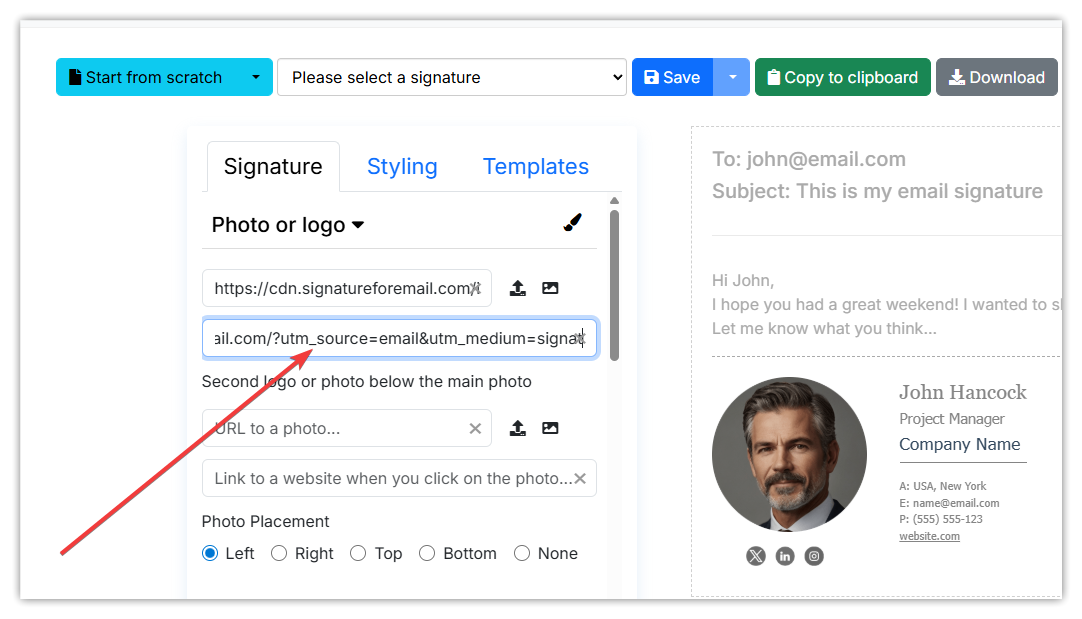 What the link looks like
A tracked link usually has a few pieces added to the end. Something like:
?utm_source=email&utm_medium=signature&utm_campaign=main_sig
It looks messy on the surface, but nobody sees it unless they hover. You can customise the words to match your setup. Some people add extra notes, like “utm_campaign=q4” or “utm_medium=signature-banner.” That way, you know which part of the signature was clicked.
In our email signature generator, you just paste your URLs with UTMs instead of the clean ones or add the UTM parameters to the URL as written above. Same link, just smarter.
Why it matters so much
Email is one of the few places where every click feels personal. These aren’t random visitors. They’re clients, leads, partners, or people you’ve already spoken with. Their behaviour tells you something different from a stranger on your website.
If they click your portfolio, maybe you should feature it more.
If nobody clicks your banner, maybe it's too big. Or too salesy.
If your “Book a Call” button gets steady traffic, maybe it's time to reduce the back-and-forth emails and push more people there.
This kind of clarity removes guesswork. And for people who write a lot of emails—sales teams, consultants, freelancers—it can reveal what’s quietly helping your business grow.
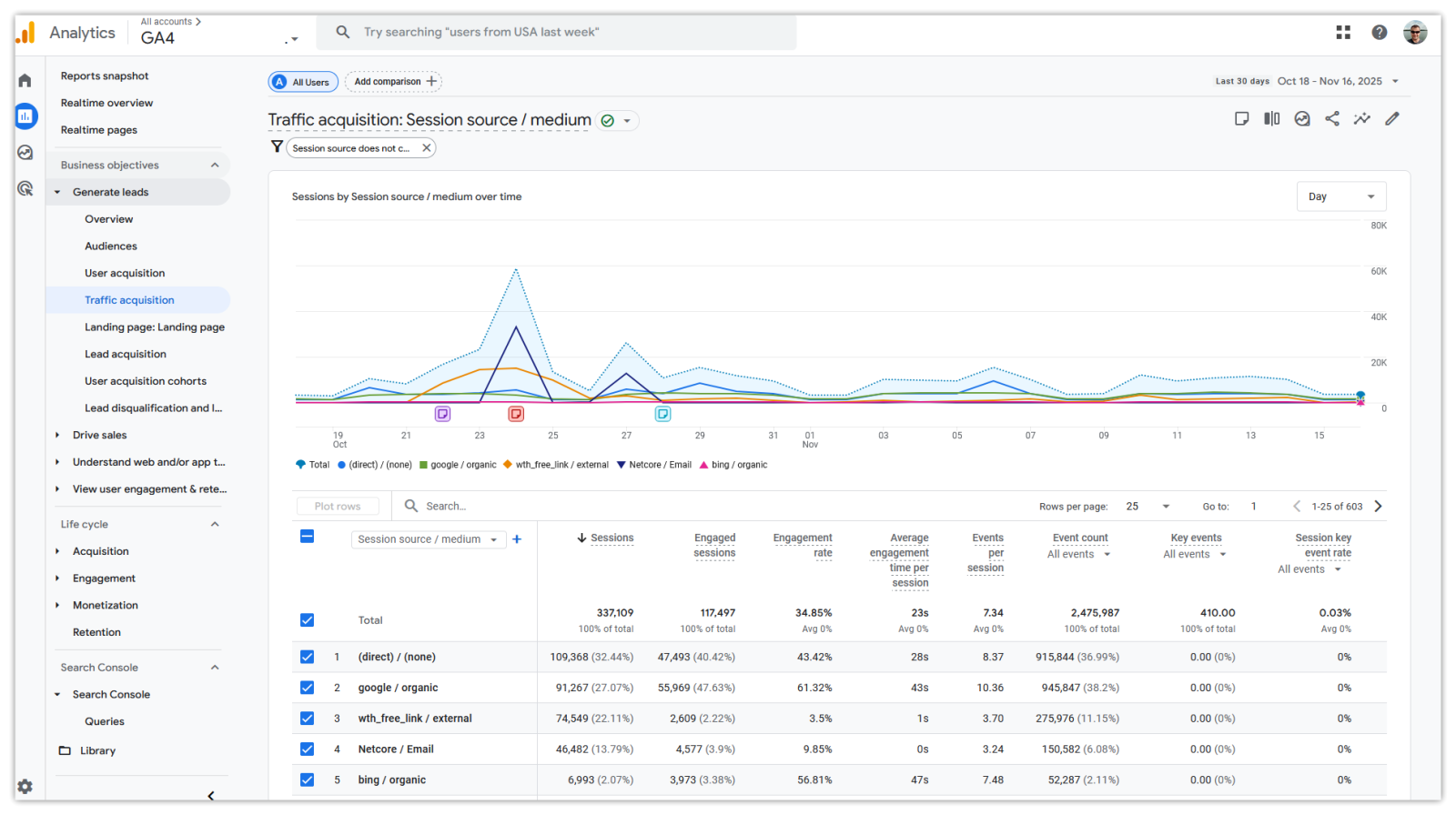
Where to track everything
You’ll see the data directly inside Google Analytics 4. It lives in a place called “Traffic acquisition.” When you filter by your chosen source or medium, the numbers show up: clicks, time on site, conversions. It’s not buried. You just need to look for it once, and after that, it becomes part of your routine.
Some folks prefer to create a custom exploration report so they can check signature traffic quickly. But even the basic view works fine.
A small habit with long-term value
The nicest part is that once you set this up, you don’t touch it again. It’s not a campaign you have to manage. It’s not another tool you must log into every week. It just runs quietly in the background.
Every email you send becomes a trackable touchpoint.
Every link becomes a small signal from the people you already talk to.
Every month, the picture gets clearer.
It’s the sort of habit that feels too small to matter, until you see the first spike. Then you’ll wonder why you waited.
If you ever update your signature, update the UTMs. If you switch to a new role, switch your campaign tag. Everything else stays the same. This is as close as it gets to free analytics—built into something you already use hundreds of times a week.
And once you start using this little trick, your email signature stops being a decoration and starts being a useful part of your funnel.